 Daniel Vos
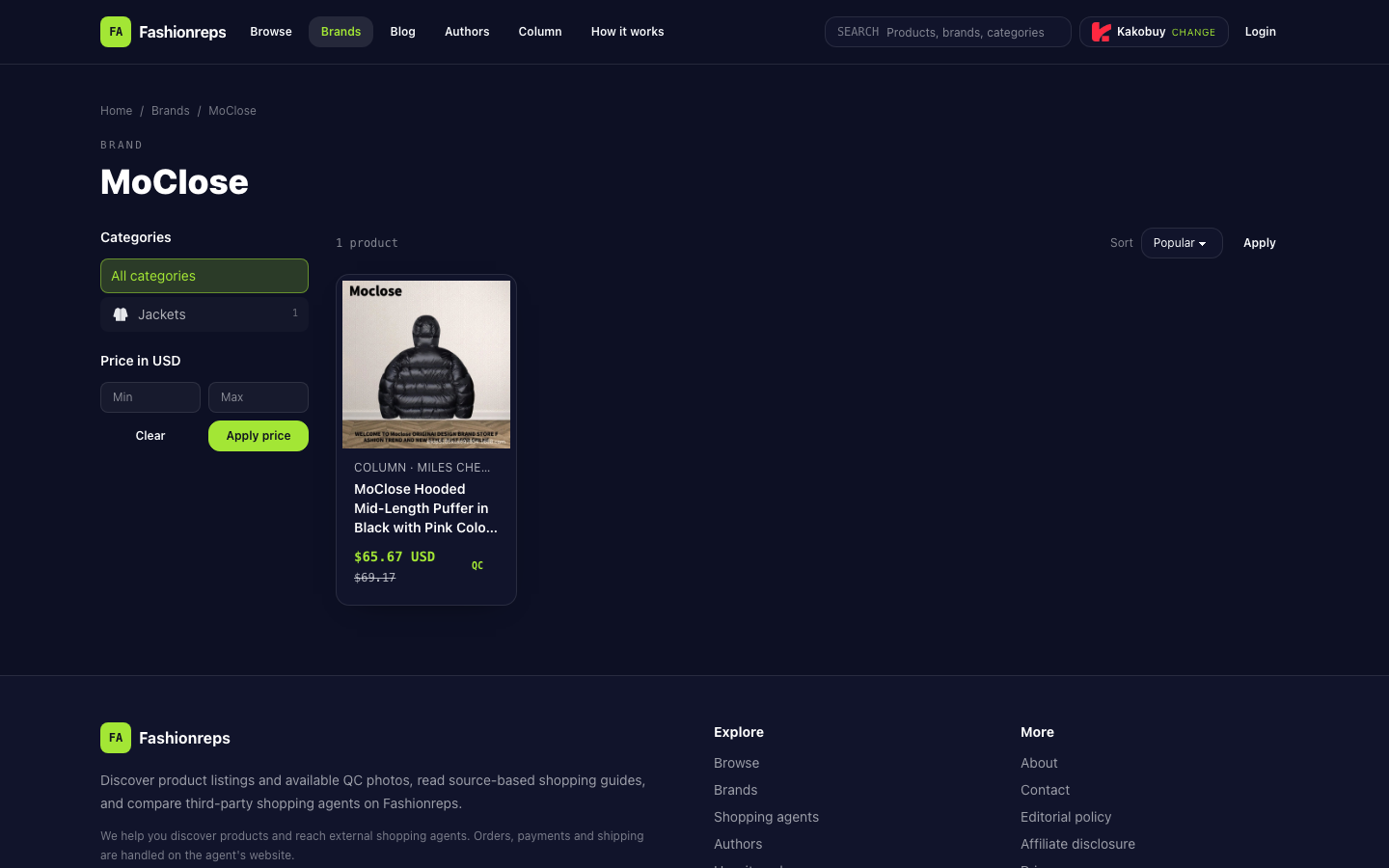
Currently, it's not appropriate to directly use the moclose page as an electronics catalog. The verified MoClose brand page shows 1 product, categorized as Jackets, and the page can be filtered by category, USD price, and sorting method. The visible product is a black and pink color-blocked mid-length hooded down jacket, the page also shows a reference price of $65.67
Editor score 4.2 / 5
Currently, it's not appropriate to directly use the moclose page as an electronics catalog. The verified MoClose brand page shows 1 product, categorized as Jackets, and the page can be filtered by category, USD price, and sorting method. The visible product is a black and pink color-blocked mid-length hooded down jacket, the page also shows a reference price of $65.67, previously $69.17. Existing evidence does not show electronics, model specifications, or electronics variants, so specific electronics parameters cannot be filled in based on this.
First Determine What the Website Catalog Can Confirm
Product cards are suitable as an entry point for first discovery and revisiting. For the current moclose page, readers can first confirm the brand, product category, product name, price information on the page, sorting results, and product detail entry. Page status should also be recorded separately, because whether the page can still be opened does not necessarily mean the product is in stock or still available for purchase.
This step only records what actually appears on the page. For electronics, only when product cards or detail pages explicitly display information should brand model, capacity, interface, size, version, color, or other specifications be filled in. Fields not shown on the page should be left blank and marked as "to be verified," and must not be guessed based on product titles or images.
Which Fields Are Suitable for Transferring to Google Sheets
When the number of candidates increases, Google Sheets is more suitable for saving structured records and review tasks. It is suggested that each candidate occupies one row, initially using a minimal field set:
| Field | Purpose |
|---|---|
| Product name and detail link | For returning to the original page to verify |
| Category, brand, and model | Distinguish different candidates, leave blank if missing |
| Variants | Record versions, colors, or specification options explicitly listed on the page |
| Evidence status | Distinguish verified, partially verified, and to be verified |
| Missing fields | Clarify what information still needs to be checked |
| Page status | Record whether the page is accessible, invalid, or needs review |
| Review date | Indicate when the record was last checked |
| Next action | For example, check specifications, confirm page status, or remove from candidates |
For the currently verified MoClose page, the table can record "Category: Jackets" and "Product quantity: page shows 1," but it cannot be expanded into an electronics candidate, nor can performance, inventory, shipping, or purchase conclusions not shown by the source be filled in.
Division of Labor Between Website Catalog and Spreadsheet
For quick discovery, prioritize using the website catalog. The brand page provides category filtering, price range filtering, and sorting entry, suitable for confirming which public products exist on the page and then entering detail pages to view original information. Images and product links should also be verified by returning to the page itself, not judged solely based on old records in the spreadsheet.
For cross-candidate filtering, transfer confirmed information into Google Sheets. For example, you can filter records for "model confirmed," "still missing interface information," or "page needs review." The value of doing this is to uniformly view missing fields and follow-up actions, rather than creating new facts not provided by the website.
For subsequent review, the spreadsheet serves as reminder and status management, and the website serves as evidence traceability. When reviewing a certain row, you should reopen the detail link to confirm whether the product name, specifications, variants, and page status have changed; if the page is invalid or product information is incomplete, you should update the evidence status instead of continuing to treat it as a purchasable recommendation.
A Sorting Process Suitable for moclose Candidates
- First open the moclose brand catalog and record the categories, product quantity, price filters, and sorting entry actually displayed on the page.
- Enter each candidate's detail page and only transcribe the name, model, specifications, and variants explicitly provided on the page.
- Put the detail link, evidence status, missing fields, and review date into Google Sheets.
- Mark candidates without model numbers or key specifications as "to be verified," and do not fill in with assumed values.
- Use the spreadsheet to filter next actions, then return to the website to review item by item.
- If the page is invalid, the product is delisted, or purchase status cannot be confirmed, keep it as a historical record or a to-be-verified item, not as a current purchasable recommendation.
Conclusion
The moclose website catalog is suitable for product discovery, category browsing, price range viewing, and detail link traceability; Google Sheets is suitable for managing models, variants, evidence status, missing fields, and review tasks. The currently verified page only supports information from the MoClose clothing catalog and cannot prove the existence of electronics candidates. To organize electronics, you must first find pages that actually display electronics models or specifications, and then transfer these verified fields into the spreadsheet.