 Daniel Vos
Clarify the Checkout Problem the Nike Fall/Winter Hoodie Coupon Should Solve Seeing a price hint for Nike or Nike × Stussy fall/winter hoodies on fashion-reps does not mean the coupon will automatically work at checkout. What you really need to confirm is: whether the coupon is provided by your current shopping agent, whether the item falls within the applicable scope, whether the order meets the threshold, and wheth
Editor score 4.2 / 5
Clarify the Checkout Problem the Nike Fall/Winter Hoodie Coupon Should Solve
Seeing a price hint for Nike or Nike × Stussy fall/winter hoodies on fashion-reps does not mean the coupon will automatically work at checkout. What you really need to confirm is: whether the coupon is provided by your current shopping agent, whether the item falls within the applicable scope, whether the order meets the threshold, and whether the discount is already reflected in the final amount due. 🧾
This checklist is for users who are preparing to buy the relevant hoodies but have not yet completed payment. After reading it, you should be able to record product conditions, verify coupon rules, and determine on the checkout page whether the discount is actually in effect. If you only have a coupon code from an unknown source, or the page does not show the full rules, it is not advisable to place an order based on that alone.
The focus of this article is on verifiable methods, not providing unconfirmed current coupon codes, nor guaranteeing savings. The fashion-reps page is responsible for product discovery and information aggregation; orders, payments, and logistics are usually handled by an external shopping agent chosen by the user, so coupon rules should be based on the actual agent account and the checkout page display.
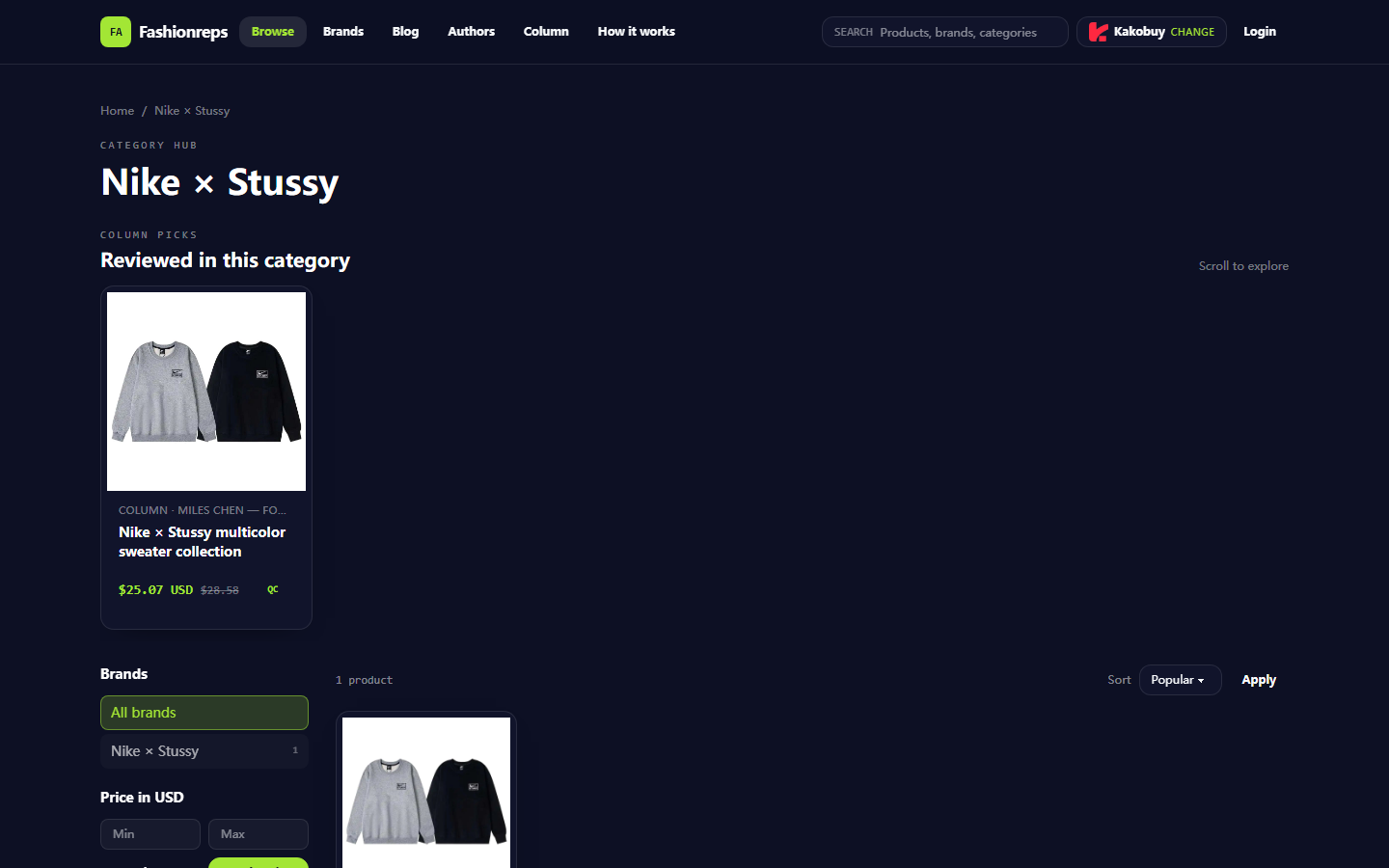
Record Specifications and Current Visible Price from the fashionreps Product Page
First, open the corresponding product page and record the following:
- Product name and whether it belongs to Nike, Nike × Stussy, or another collaboration category
- Colors, sizes, and selectable specifications shown on the product page
- The current reference price and original reference price shown on the page
- Whether the product page is still accessible, with a clear product name and visible information
- Which agent the entry button or selection option for the shopping agent leads to
The currently visible Nike × Stussy category page displays a multicolor sweater collection, with a reference price of $25.07 and a previous reference price of $28.58. The "reference price" here can only be used as a page record, not as the final product price from the shopping agent, and certainly cannot be automatically interpreted as the price after coupon. The actual amount may also be affected by agent service fees, domestic shipping, international shipping, taxes, exchange rates, and other order fees.
It is recommended to keep page screenshots or text excerpts in your records, and write down the verification date, currency, and page name. Do not save only a price image without a date, because products, inventory, and prices may change. 📌
Verify Coupon Claim Entry, Applicable Threshold, and Validity Period
The first question about a coupon is "who issued it." Common sources include the coupon center within the shopping agent account, automatic prompts on the order checkout page, official agent activity pages, or in-site notifications clearly bound to the account. The fashion-reps product discovery page is not automatically equivalent to the coupon issuance page of the shopping agent.
After entering the agent account you actually intend to use, check in the following order:
- See if there are available coupons in the coupon center or on the checkout page.
- Open the coupon details and record the discount amount or percentage, minimum spend amount, applicable currency, and applicable business.
- Record the start time, end time, and whether it is calculated based on the account time zone.
- Confirm whether the coupon is limited to new users, specific regions, specific payment methods, or specific shipping lines.
- Check whether it requires claiming first, recharging, binding the account, or entering through a specific activity entrance.
- Return to the order draft and confirm whether this coupon can be selected by the system, rather than just being shown on a promotional page.
If the coupon details do not clearly state the expiration time, applicable products, or minimum spend amount, you should not fill in the rules yourself. When the page only shows vague text like "discount," "sale," or "promotion," you cannot infer the existence of a usable coupon code. 🔍
Check Exclusions Such as Size, Color, Category, and Order Conditions
Whether a coupon can be used usually depends not only on the product name. You need to check the exclusion conditions item by item:
- Whether the product belongs to a specified category; hoodies, outerwear, shoes, and accessories may be handled separately
- Whether Nike and Nike × Stussy are treated as the same category
- Whether the selected color and size are still within the scope of the promotional products
- Whether the discount excludes special-priced, clearance, collaboration, or already discounted items
- Whether the minimum spend is calculated based on the product subtotal, or including service fees and domestic shipping
- Whether there is a limit on usage per account, per order, or per user
- Whether a specific payment method or shipping line must be used
- Whether it can be stacked with other promotions, balance, points, or automatic discounts
"The page has a promotional hint" does not mean all variants are eligible. If different colors or sizes of the same product correspond to different inventory records, the actual selected variant should prevail at checkout. Price differences on the page may also come from specifications, inventory, or re-quoting by the agent, not from coupon changes.
Distinguish Product Page Promotional Hints from Final Checkout Amount
The product page can only help you discover the product and record visible information. Whether you really save money must be verified on the order confirmation page of the shopping agent.
You can use the following simple recording method to compare the amounts before and after discount:
| Check Item | What to Confirm |
|---|---|
| Product subtotal | Actual product amount after selecting size and color |
| Coupon | Coupon name, discount amount or percentage, applicable conditions |
| Other discounts | Whether there are automatic discounts, points, or balance deductions |
| Additional fees | Service fees, domestic shipping, payment fees, or other order fees |
| Final amount due | Actual amount shown on the checkout page before payment |
If the page only shows a decrease in product price without displaying the coupon name or deduction amount, do not attribute the price difference directly to the coupon. Conversely, if the checkout page shows the coupon applied but the final amount due has not changed, you should check the minimum spend, the order of fee calculation, and whether there are other fees.
Coupon discounts may only apply to the product subtotal, not to international shipping, insurance, taxes, or agent service fees. Therefore, when comparing, record both "total before discount" and "final amount due after discount," rather than just looking at the eye-catching discount figure. 💰
How to Preserve Evidence and Stop Guessing When There Is No Current Coupon Code
If there is no verifiable coupon code available at the moment, the safest approach is to preserve the verification path rather than trying random codes circulating online. It is recommended to save:
- Product page name, selected specifications, and page displayed price
- Shopping agent name and coupon page status within the account
- Threshold, exclusions, and expiration time in the coupon details
- Whether a selectable coupon appears on the checkout page
- Product subtotal and final amount due before and after applying the coupon
- Date, time, and currency corresponding to the screenshots
When a coupon shows "expired," "not applicable," "minimum spend not met," or cannot be selected on the checkout page, mark it as unavailable. Do not modify order conditions to force meeting the threshold, and do not assume a coupon is still valid because of an old screenshot or forum repost. Without current official or agent account page support, this article does not provide specific discount promises. ⏳
Coupon Verification Checklist Before Placing an Order
Before payment, confirm each of the following:
- Product page is still accessible, and the name matches the selected specifications
- Current date, currency, and visible product amount are recorded
- The issuer and claim entry of the coupon have been confirmed
- Minimum spend, applicable category, and exclusions have been read
- Size, color, collaboration, or special-price status have been checked
- Expiration date has not passed
- Whether it can be stacked with other discounts has been checked
- Checkout page clearly shows the coupon applied
- Product discount, service fees, shipping, taxes, and final amount due have been recorded separately
- Order conditions match the conditions you actually intend to pay under
If any of these cannot be confirmed, save the order draft and evidence first, then contact the shopping agent customer service for verification; do not pay directly.
Final Action: Decide Whether to Proceed Based on Verifiable Checkout Page Results
Only when the checkout page clearly shows the coupon applied and the final amount due is indeed lower than the comparable amount without the coupon, can you consider this coupon currently valid. If the coupon only lowers the product subtotal, but additional fees offset the savings, you should re-evaluate based on the final amount due.
The potential savings from using a coupon are the actual difference shown on the checkout page; the added risks include temporary rule changes, coupon expiration, order conditions not met, inability to stack, and buying unwanted items to meet the threshold. Suitable users for the coupon are those who are already prepared to buy eligible hoodies and do not need to alter the order structure additionally.
It is not recommended to buy extra items to meet the minimum spend, accept unwanted sizes or colors, give up a more suitable shipping option, or rely on coupon codes without current official basis. For such orders, a verifiable final amount is more important than the discount percentage shown on the promotional page.