 Daniel Vos
Verification date: October 13, 2026 When browsing foreign trade items on Fashionreps, if the product title, category, size, color, or reference price on the listing doesn't match the detail page, don't place an order right away a
Editor score 4.2 / 5
Verification date: October 13, 2026
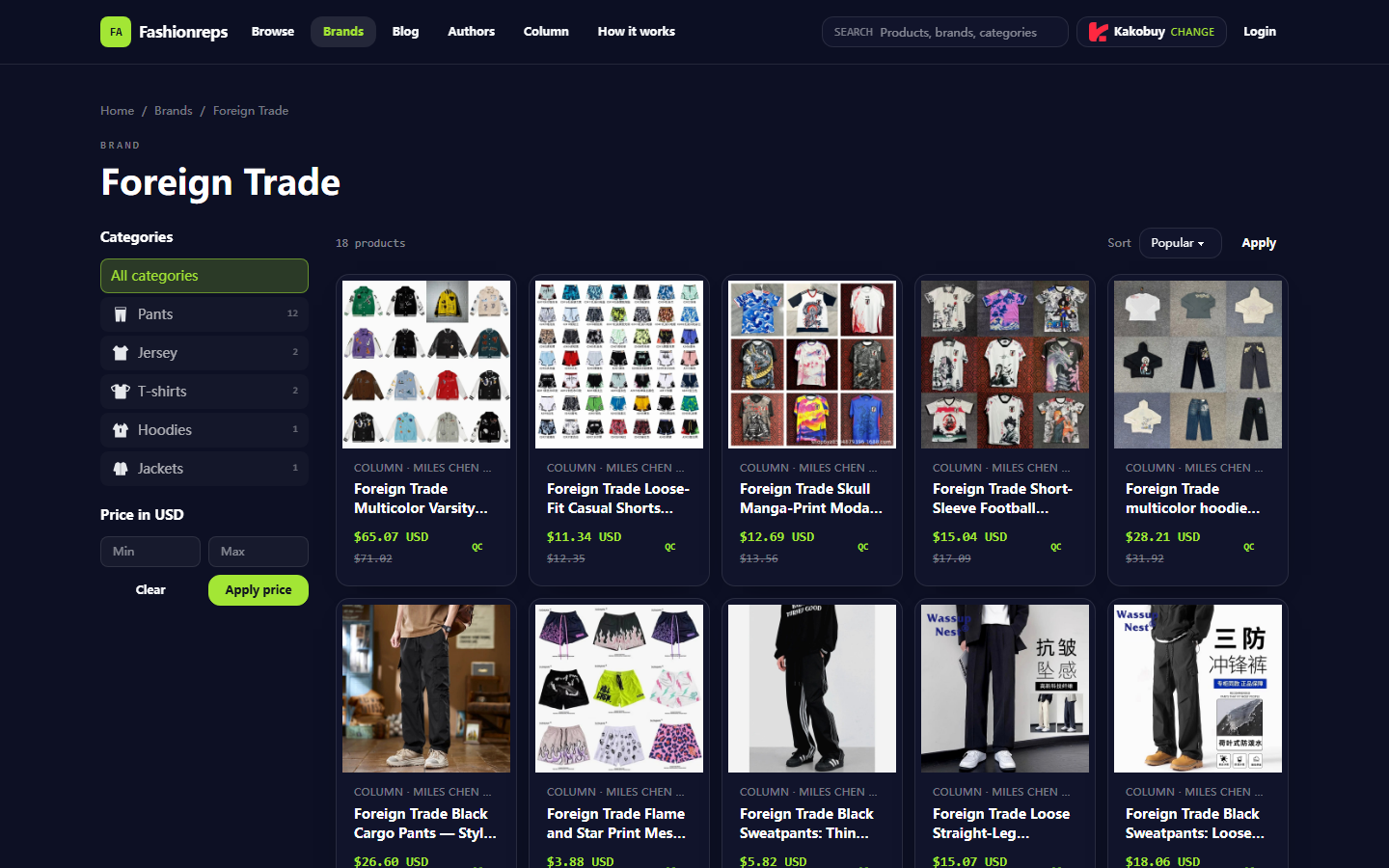
When browsing foreign trade items on Fashionreps, if the product title, category, size, color, or reference price on the listing doesn't match the detail page, don't place an order right away and don't assume the page is definitely broken. Catalog pages and product detail pages may serve different information display purposes, and products may be updated at different times. This article addresses one specific problem: information inconsistency between product pages. After completing the checks, you should be able to determine whether it's a page update, browser display issue, missing fields, or something that needs confirmation from the relevant support channels. 🧭
This article does not cover payment failures, warehouse QC photo disputes, logistics delays, or customs issues; those situations require keeping order and logistics evidence separately and then following the corresponding procedures.
What this foreign trade product page check solves
Common symptoms include:
The name on the catalog card differs from the detail page title.
The catalog page shows a certain color or size, but the detail page variant selector doesn't have it.
The reference price differs from the price on the detail page.
The same product shows different images on category pages, search results, and the detail page.
The page opens, but key fields are empty, load incompletely, or keep changing.
First narrow the issue down to "which fields are inconsistent" rather than vaguely saying "the product info is wrong." Only by identifying the specific fields can you have a basis for later screenshots, inquiries, and decisions to abandon.
First record the page address, time, and visible fields
After opening the page, record the following:
The product page URL and the path you used to reach it, such as brand page, category page, search results, or saved items.
The time the page was opened, at least to the minute.
The product title, category, reference price, size, and color displayed on the page.
The currently selected shopping agent. Fashionreps page states that the Buy button will lead to the user's selected external shopping agent, and orders, payment, and shipping are handled by that agent's website.
Device, browser, and whether you're logged in.
Whether the page shows loading failures, blank areas, price refreshes, or redirects.
Reference prices are time-sensitive fields. Fashionreps' foreign trade catalog samples show that product cards display both the current reference price and the previous reference price, but this cannot replace the final price on the external agent's checkout page, nor can it prove that stock still exists. 💰
It's recommended to save two sets of screenshots:
The catalog page or search result showing the inconsistent field.
The product detail page showing the same field.
Screenshots should include the page title, field name, and time information, and should not expose order numbers, payment information, full shipping address, or personal contact details.
How to compare product title, category, and variant info item by item
Follow a fixed order for checking, and don't just rely on whether the images look similar.
| Checkpoint | What to compare | How to record |
|---|---|---|
| Product identity | Title, product image, brand or series description | Mark as consistent, partially consistent, or unconfirmed |
| Category | Catalog category vs. detail page category | Note if it's just a different category archive |
| Variants | Color, size, style number, or option names | List what the catalog has but the detail page lacks |
| Price | Current reference price, previous reference price, detail page price | Record currency and display time; don't convert to final settlement price yourself |
| Page status | Whether it loads, redirects, or shows empty fields | Save error messages or blank area screenshots |
If the title differs slightly but the product image, style number, color, and size options all match, it might just be that the catalog title was edited. If the title is similar but the images, variants, and style numbers are completely different, consider the identity unconfirmed and don't replace evidence with "it looks like the same item."
What to check first when size, color, and reference price don't match
The first step is to confirm you're comparing the same product, not another product from the same brand. Pay special attention to:
The catalog page may combine multiple colors or styles into one product card.
The detail page may only show currently available variants; a missing color doesn't necessarily mean it's out of stock.
The reference price may correspond to the lowest price, a specific variant, or a historical display value.
Different agents' service fees, domestic shipping, international shipping, taxes, and payment exchange rates may change the final amount.
The units, measurement methods, and available range in the size chart may differ from the catalog summary.
Don't infer actual size from model photos, and don't treat the material listed on the page as a verified feel. Before purchasing, rely on the size chart, variant options, and pre-checkout amount visible on the detail page; if that information is missing, mark the field as "unverified." 📏
How to distinguish between page updates, browser cache, and missing information
You can perform a low-risk recheck in this order:
Do a hard refresh on the same page and wait for the main fields to finish loading.
Close the old tab and re-enter the product detail page from the brand page or category page.
Check in an incognito window or on another device, but don't enter payment information on unfamiliar pages.
Compare whether the page update time, title, images, and variants change together.
Change only one condition at a time, such as switching colors first, then re-checking size and price, to avoid operating multiple options simultaneously.
Record the recheck results, and don't refresh repeatedly until you can't tell which version is the actual page state.
If after a hard refresh only the price changes while the title, images, and variants stay the same, note the price fluctuation, but don't conclude that the product has been replaced. If different entry points show different product images or variants, and the issue persists after re-entering, escalate it as "identity or fields unconfirmed."
When to go back to the brand page or product detail page for rechecking
Return to the foreign trade brand page or original product detail page in these cases:
The catalog card doesn't have complete size or color information.
The detail page title only partially matches the catalog title.
The reference price changes but there's no indication of which variant it applies to.
The external agent page reached via the Buy button doesn't correspond to the same product.
The page image, product description, and selectors can't corroborate each other.
Fashionreps acts as a platform for product discovery and information organization, and the actual order, payment, and shipping are handled by the external shopping agent selected by the user. Therefore, the catalog page information only helps you locate the product and cannot replace the product confirmation, stock confirmation, or settlement confirmation on the agent's page. 🛒
What screenshots and questions to prepare before contacting the agent
If after rechecking the inconsistency remains, submit a short and clear set of questions to the relevant support channel:
"The product title shown on the catalog page is ..., while the detail page shows ...; do they correspond to the same product?"
"The catalog page lists color ..., but the detail page doesn't have that option; please confirm whether that color is still available for purchase."
"The catalog reference price is ..., while the detail page or pre-checkout shows ...; please confirm the applicable variant, currency, and fee range."
"The size chart is missing ... field; is there actual size information available for confirmation?"
Suggested attachments include:
Catalog page screenshot.
Detail page screenshot.
Variant selector screenshot.
Recheck time and browser environment.
Product page URL, but do not include account passwords, payment cards, passports, full shipping labels, or other irrelevant private information.
First contact the shopping agent that actually handles the order for issues related to orders, prices, stock, and shipping; if the issue only involves Fashionreps' page display or entry correspondence, provide feedback through the site's public Contact channel. Do not treat an external agent's promise as an official guarantee from Fashionreps, and do not repeatedly submit orders without confirming the responsible party.
Conditions for stopping actions when evidence is insufficient
Stop any purchase or payment action if any of the following occurs:
Cannot confirm that the catalog page and detail page refer to the same product.
Key size, color, or style number is missing, and the support channel has not provided a clear answer.
After a price change, cannot confirm the applicable variant, currency, or fee range.
The page asks for sensitive information unrelated to the purchase.
The external page reached via the Buy button cannot identify the product or explain order ownership.
The page keeps showing errors, redirecting, or displaying multiple conflicting checkout results.
You can only rely on product images to guess material, size, stock, or authenticity.
Stopping doesn't mean giving up on all foreign trade products; it means preserving existing evidence and waiting for fields to be confirmed. Do not split orders, underdeclare, or otherwise bypass platform, tax, or customs requirements.
After completing the check: proceed or abandon
If the title, product identity, variants, price conditions, and order entry all correspond, you may proceed with the normal purchase process on the external agent and re-verify the final amount, size, color, shipping information, and applicable terms before payment. Page reference prices are only clues for comparison and cannot be considered the final cost.
If key fields remain unconfirmed, abandon the purchase, keep screenshots and recheck records, and look for a product with more complete information or wait for a support response. This decision is suitable for buyers who value traceability, cannot afford the risk of a wrong purchase, or need accurate size and color; it is not suitable for situations where low price and quick ordering are prioritized over evidence completeness.
Completing the check may save you from refund negotiations, returns, and repeated payment costs after a wrong order; the trade-off is waiting for confirmation, re-filtering products, or bearing the opportunity cost of the product temporarily going out of stock. No check process can guarantee that stock, price, or logistics won't change afterward, so always recheck the real-time page before finally submitting the order. ✅
Article images