 Daniel Vos
Separate "Candidates" from "Product Identity" First When organizing NBA jerseys, the most common mistake is merging items just because their titles look similar. Same team, same player, or similar colorways don't necessarily mean they're the same product; the same product can also appear multiple times due to different colors, size ranges, or page titles. A safer approach: first use Fashionreps' NBA catalog to collect candidates, then use Google Sheets to build pr
Editor score 4.2 / 5
Separate "Candidates" from "Product Identity" First
When organizing NBA jerseys, the most common mistake is merging items just because their titles look similar. Same team, same player, or similar colorways don't necessarily mean they're the same product; the same product can also appear multiple times due to different colors, size ranges, or page titles.
A safer approach: first use Fashionreps' NBA catalog to collect candidates, then use Google Sheets to build product identity and duplicate-check records. The catalog is for discovering products, viewing images, and accessing links; the sheet is for filtering fields, marking suspected duplicates, and recording follow-up verification results.
Step 1: Build a Candidate List in the NBA Catalog
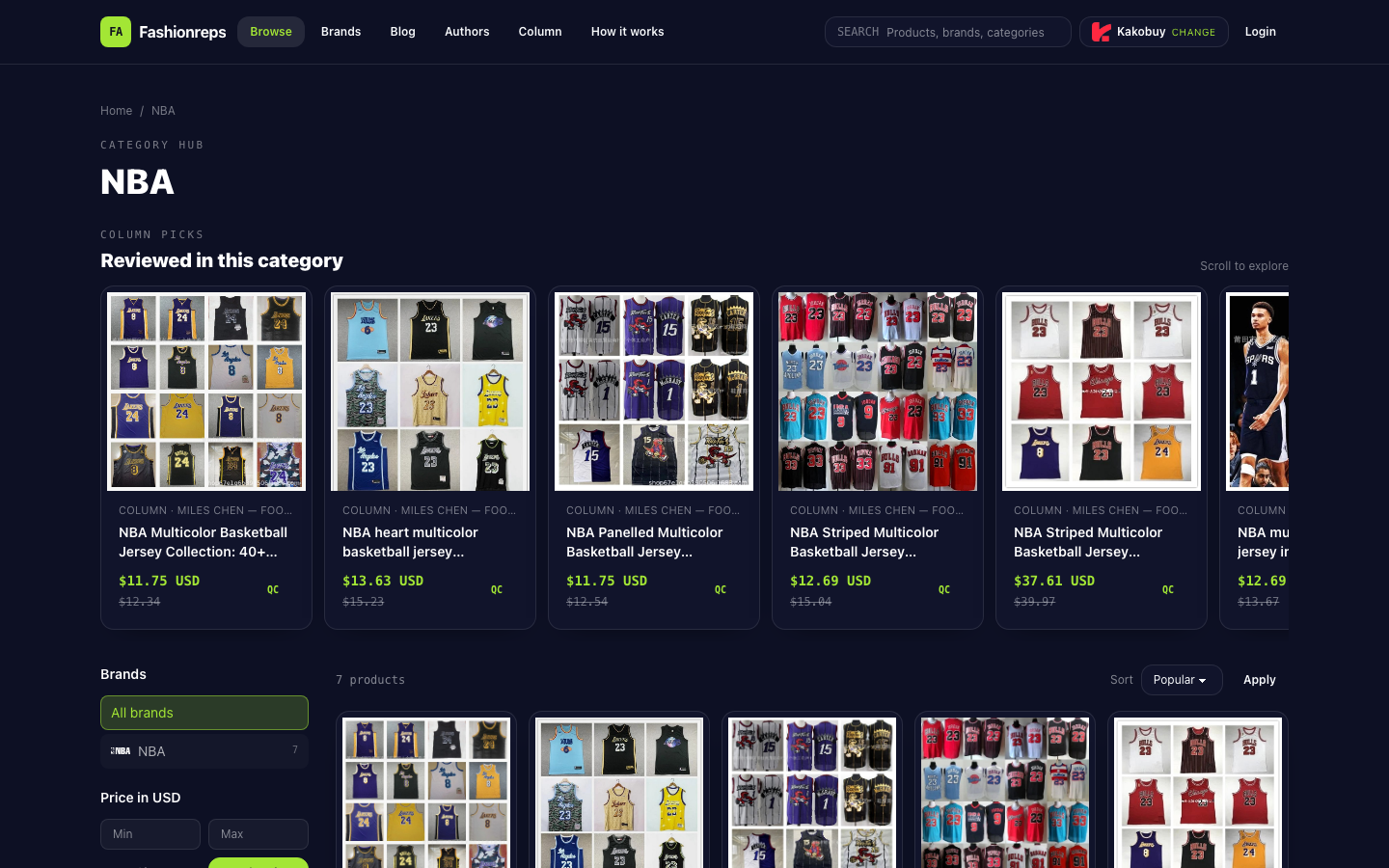
As of the page check, Fashionreps' NBA category page shows 7 product candidates, with brand filters, price range filters, and sorting options. The page also displays product titles, reference prices, previous reference prices, and QC entry points. Prices on the page are reference information and should not be taken as final purchase costs; shipping, agent fees, inventory, and actual settlement prices need to be confirmed later in the purchase process.
Candidate titles in the catalog include different styles and size information, for example:
- Kobe era colorway collection, marked men's S–XXL;
- Heart-shaped multicolor basketball jersey collection;
- Cotton patchwork multicolor jersey, marked with nine colorways;
- Striped multicolor jersey, one marked M–5XL, another marked S–XXL;
- Cotton fabric multicolor replica jersey, marked unisex S–XXL;
- Polyester embroidered multicolor basketball jersey collection, marked S–XXL.
These titles can help you do initial grouping, but they alone cannot prove product identity. Especially descriptions like "striped," "multicolor," "S–XXL" may appear in multiple candidates, and you still need to check detail page images, colors, player information, and size fields.
Step 2: Fix Record Fields in the Sheet
It's recommended to have each row correspond to one catalog candidate at first, not to merge by team or player right away. The sheet can use the following fields:
| Field | How to Record | Purpose |
|---|---|---|
| Catalog Title | Copy the page title as is | Preserve the text evidence from initial discovery |
| Product Link | Record the unique product link | Determine if it's the same page |
| Team | Fill in after confirmation | Distinguish team identity |
| Player or Jersey Number | Fill in if clearly shown on page | Distinguish different players on same team |
| Season or Era | Fill in only with evidence | Avoid merging different seasons |
| Style and Color | Record based on images or detail page | Handle different colorways with same title |
| Size Range | Record as is, e.g., S–XXL | Distinguish size versions or specs |
| Image Verified | Yes, No, or Pending | Mark whether visual review is complete |
| Suspected Duplicate Group | Use a code, e.g., D01 | Put candidates into groups for judgment |
| Missing Fields | Note what's missing | Avoid filling in with guesses |
| Review Date | Record the check date | Ease later re-confirmation of page status |
Product link should be the first-level dedupe key. When the same link appears multiple times, usually merge the records first; different links, even with very similar titles, should be kept as separate candidates until detail page evidence supports merging.
Step 3: Judge Duplicates by Three Layers of Identity
Layer 1: Are the links the same?
If two candidates have exactly the same product link, you can first treat them as duplicate records of the same page. But still keep the source location or discovery date to avoid losing information during filtering.
If the links are different, don't merge them just because the titles are similar. Different links may correspond to different colors, different size versions, different seller pages, or different product collections.
Layer 2: Are team, player, and jersey number consistent?
Same team name only suggests the team dimension might match, not that the jerseys are identical. Continue checking player name, jersey number, and page images. If the page doesn't clearly show player or number, mark that field as "unconfirmed" and don't guess based on common colorways.
Different players on the same team should be kept as separate identities. If the page is just a collection page without listing each specific player, record it as a "collection page" rather than splitting it into multiple single items yourself.
Layer 3: Are season, era, style, and size consistent?
Season or era information is a key field in NBA jersey deduplication. When titles include descriptions like "Kobe-Era," only record the era label explicitly provided on the page; don't fill in specific seasons without evidence.
Then compare style and color, such as striped, patchwork, heart-shaped, multicolor, or embroidered descriptions. Also check the size range. S–XXL and M–5XL cannot be judged as the same spec from title alone, nor merged simply because both include M, L, or XL.
Handling Suspected Duplicates in Google Sheets
Sort the sheet by "Team," "Player or Jersey Number," "Season or Era," "Style and Color," and "Size Range" to quickly see which candidates need to be rechecked in the catalog or detail page. When filtering, it's better to first narrow down to the same team, then check player, era, and style fields, rather than searching only by title.
You can set simple codes for suspected duplicates:
- D01: Same link duplicate records;
- D02: Same team, same player, but style or color to verify;
- D03: Similar titles, insufficient detail page evidence;
- D04: Different size or color candidates from the same collection page.
"Suspected duplicate" does not mean "merged." Only when link, product identity, and key specs all match should you change the status to "confirmed duplicate." If images and titles don't match, or the detail page lacks necessary fields, keep two records and note what needs to be rechecked in "Missing Fields."
What the Catalog and Sheet Are Each Good For
Fashionreps' NBA catalog is good for browsing candidates from the category page, using brand, price range, and sorting functions to narrow down, then opening product pages to view images, QC info, and links. It's more of a product discovery entry, suited for answering "What candidates are there?" and "Where to look next?"
Google Sheets is good for breaking down catalog information into fixed fields, filtering by team, player, season, style, and size, and recording duplicate judgments, missing fields, and review dates. It's more suited for answering "Which candidates might be the same?", "Which fields are still unconfirmed?", and "Where should the next organizer continue?"
The two are not replacements for each other. After the catalog page updates, records in the sheet still need to be checked against the original page; classifications and marks in the sheet also cannot be used as evidence for the product page itself.
An Actionable Review Order
- Copy candidate titles and product links from the NBA category page.
- Record visible reference prices, sizes, and style descriptions from the page; don't fill in information not shown.
- Open the candidate detail page and check team, player or number, season or era, color, and images.
- Put each candidate separately in the sheet; don't merge early because of similar titles.
- Dedupe by product link first, then build suspected duplicate groups by team, player, era, style, and size.
- For candidates with the same title but different links, review one by one, especially checking images and size ranges.
- Mark fields that cannot be confirmed as "pending" and record the review date.
- Mark as "confirmed duplicate" only when evidence is consistent; keep separate records when evidence is insufficient.
This recording method reduces two types of errors: adding the same product multiple times to the candidate list, and incorrectly merging products that are same team but different player, season, colorway, or size.