 Daniel Vos
Clarifying the Screening and Verification Task for boston celtics Jerseys If your goal is to confirm the size, color, images, and product link of a Boston Celtics jersey before placing an order, the core isn't simply finding a title—it's making sure the page information matches your own records item by item. This article is for buyers who have already found a candidate product but are worried about incomplete size fields, mismatched images, or
Editor score 4.2 / 5
Clarifying the Screening and Verification Task for boston celtics Jerseys
If your goal is to confirm the size, color, images, and product link of a Boston Celtics jersey before placing an order, the core isn't simply finding a title—it's making sure the page information matches your own records item by item. This article is for buyers who have already found a candidate product but are worried about incomplete size fields, mismatched images, or links that are hard to find later.
After reading, you should be able to do four things:
- Locate candidate cards in fashion-reps' website-style product catalog.
- Organize the candidate product's title, size, color, images, and link into Google Sheets.
- Compare the page with your spreadsheet to identify missing, outdated, or unverifiable fields.
- Keep a reviewable record before choosing a shopping agent and proceeding with the order.
This article doesn't treat the catalog page as an order, inventory, or quality assurance page. Reference prices, available sizes, images, seller information, and link status should all be re-verified by reopening the original page before placing an order. 🧾
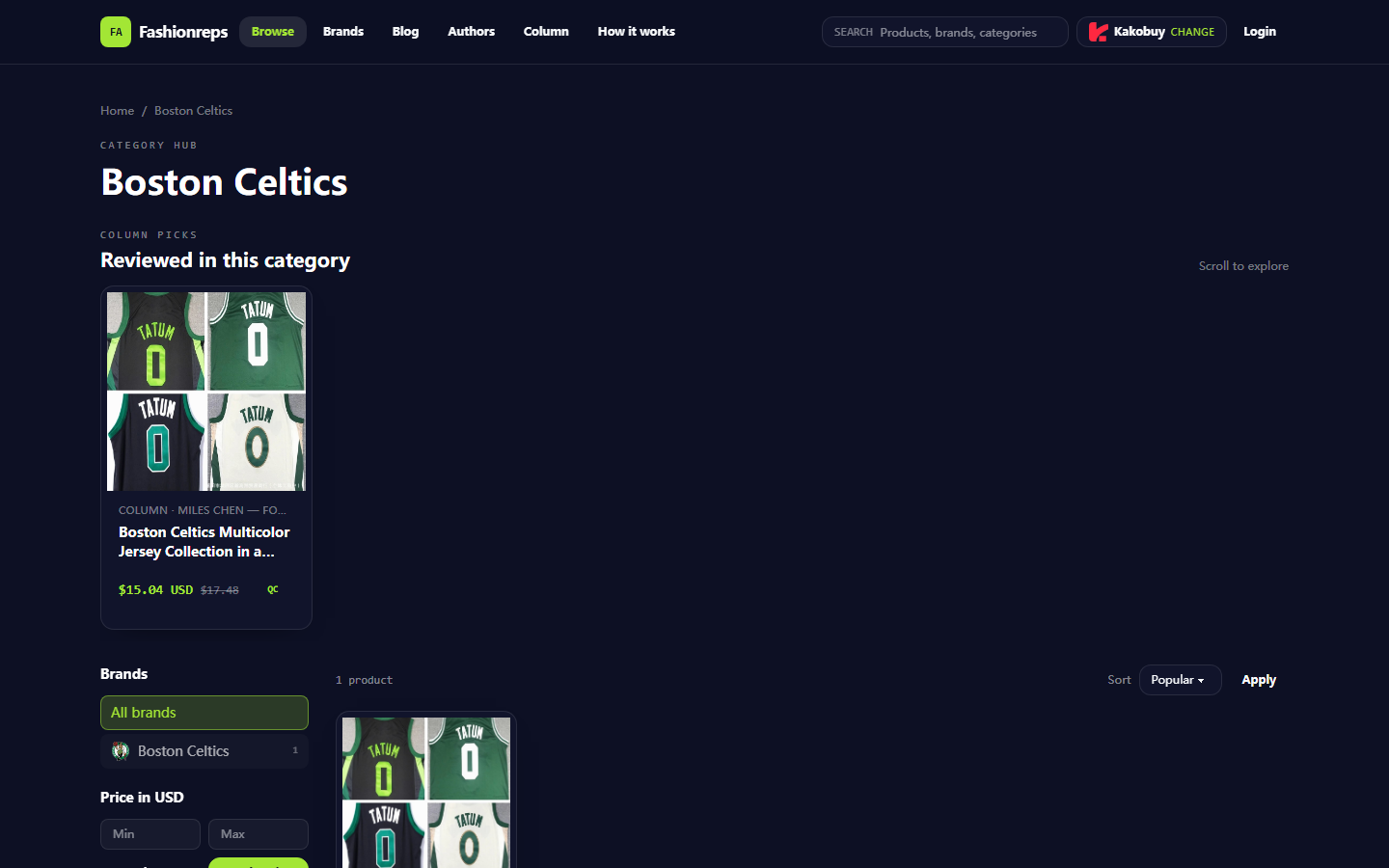
Image: The product catalog and filtering interface on the fashion-reps Boston Celtics category page. The information visible on the page should serve as a starting point for candidate records, not as a substitute for final verification on the product page, QC images, or shopping agent page.
Viewing Categories, Images, and Product Cards in the fashionreps Website-Style Spreadsheet
The given fashion-reps page is an entry to the Boston Celtics category, showing one product card titled Boston Celtics Multicolor Jersey Collection in a Polyester Blend, Unisex S–XXL. The card also displays a reference price of $15.04, a previous reference price of $17.48, and summaries such as Multicolor, Polyester Blend, and Unisex S–XXL.
The main purpose of this type of website-style spreadsheet is to combine product discovery, category browsing, and initial screening on one page. You can first check the following fields:
- The category is indeed Boston Celtics, not generic basketball jerseys or other teams.
- The product card title explains the style, material, gender suitability, and size range.
- The reference price is clearly marked as a reference value, not the final payment amount.
- The page offers a QC entry or QC image entry.
- Clicking opens a product page for further verification.
- The image on the current page matches the product title and color description.
The brand filter, price filter, sorting options, and product count on the page are useful for narrowing down candidates. The given page shows Boston Celtics in the brand filter, a price range in USD, sorting options including Popular, Newest, Price Low to High, and Price High to Low; it also shows that the current category has 1 product. This information only reflects the current display of the catalog and does not imply that all products, inventory, or prices remain unchanged.
When verifying images, don't just look at thumbnails. Open the product details or QC-related entry to check if the images support the following judgments:
- The front and back of the jersey are the same style.
- The color name corresponds to the image.
- The image is a product photo, QC photo, catalog photo, or just a display image.
- The image shows mixing of other sizes, colors, or styles.
- The image contains order numbers, names, addresses, or shipping labels that need to be obscured.
If the page only has a product summary without detailed images for review, write "insufficient image information" in your records; don't treat catalog images as quality evidence. 📷
Setting Up Size, Color, Image, and Link Fields in Google Sheets
Google Sheets is better for saving candidate records, filtering, and collaboration. It's recommended that each candidate occupies one row and each verification item one column, avoiding mixing multiple sizes or links in one cell.
Recommended fields are:
| Field | Recording Method | Verification Focus |
|---|---|---|
| Product Title | Copy the current page title | Keep original spelling, don't rewrite as marketing title |
| Team or Theme | Boston Celtics | Prevent mixing in products from other teams |
| Color | Record page text and image observation | Mark as pending if text and image conflict |
| Material | Record material shown on page | Fill "Not specified" if page doesn't state |
| Size Range | e.g., Unisex S–XXL | Don't treat range as actual stock |
| Reference Price | Record amount, currency, and date | Not equal to price including shipping or tax |
| Product Link | Save original openable link | Reopen to confirm no broken or abnormal redirects |
| Image Link or Screenshot Location | Record corresponding image | Distinguish catalog image from QC image |
| Verification Status | Pending, Verified, Need more evidence | Avoid words like "guaranteed" or "authentic" without evidence |
| Verification Date | Use actual viewing date | Helps identify outdated information |
For the size field, keep the page's representation, such as S–XXL, and add a separate column "Size chart verified." If the page doesn't provide specific measurements like chest width, length, or shoulder width, don't estimate centimeters from letter sizes. Buyers needing precise fit should look for a size chart on the product page or confirm with the shopping agent.
The color field should also be split into "Page text" and "Image observation" columns. This distinguishes colors explicitly stated on the page from initial judgments based solely on images. Image colors can be affected by lighting, compression, or screen settings, so they should only serve as auxiliary information.
For the link field, don't save just a vague search term. Save the product detail URL that can reopen, and record the last opened date in the spreadsheet. If the link is broken, redirects to an empty page, or only goes to a tab, change the status to "Need more evidence" instead of continuing to use the old record. 🔗
Comparing Page Information with Spreadsheet Records for the Same Candidate
It's recommended to complete a full comparison for the same candidate product, rather than viewing one product on the page and filling in another similar one in the spreadsheet. The comparison order can be fixed as title, category, size, color, images, price, link, and QC evidence.
Step 1: Confirm the title. The title in the spreadsheet should match the current page title. You can add a short internal identifier in notes, but don't overwrite the original title, otherwise it's hard to tell if the record corresponds to the same product later.
Step 2: Confirm the category. The page should be in a Boston Celtics-related category or clearly tagged with Boston Celtics. Just because the image shows green, basketball, or team crest style isn't enough to classify the product into that category.
Step 3: Confirm size. The page's "Unisex S–XXL" only indicates the size range in the summary. It doesn't prove every size is currently in stock, nor that the actual measurements scale proportionally across sizes. Without a detailed size chart, keep "Range shown, specific measurements unconfirmed" in the spreadsheet.
Step 4: Confirm color and images. When the page title contains "Multicolor," you can record "Multicolor" in the spreadsheet, but don't write specific color combinations unless the page or images clearly support that. If images show multiple angles, check if they belong to the same candidate.
Step 5: Confirm price. $15.04 and $17.48 are reference price information shown on the page. They should not be written as the final transaction price, and they don't include shopping agent service fees, domestic shipping, international shipping, taxes, or other possible costs. Price records must include currency and verification date.
Step 6: Confirm link and QC. A link opens only means the navigation path is temporarily working; it doesn't prove product quality, stock, or shipping. If QC images exist, record their source and corresponding product separately; don't copy QC images from other products into the current row.
Finally, set a simple status value in the spreadsheet:
- Pending: Only catalog discovery completed.
- Page verified: Title, category, summary info, and link reopened.
- Insufficient evidence: Missing size chart, images, QC, or valid product page.
- Recheck before order: Waiting to reconfirm price, stock, link, and agent page.
Comparing Search, Filtering, Image Preview, and Link Opening
The website-style spreadsheet and Google Sheets have different roles. The former is for discovery and browsing, the latter for saving, comparing, and collaborating. Don't treat Google Sheets as a real-time product database, and don't treat the website catalog as your order management sheet.
| Verification Task | fashion-reps Website-Style Spreadsheet | Google Sheets |
|---|---|---|
| Find candidates | Rely on category, brand, price filters, and sorting | Rely on existing records filtering or search |
| View product summary | Directly view product card, title, and reference price | Save fields verified from page |
| View images | Through catalog or product page entry | Record image URL, screenshot location, and image type |
| Compare multiple candidates | Affected by current display count and navigation | Can sort by size, color, status, or price |
| Collaborative review | Depends on page reopening | Can add notes, assignee, and verification date |
| Real-time judgment | Based on current visible page info | Depends on last updated date, usually not auto-synced |
The website catalog is more suitable for starting from a specific theme, such as entering the Boston Celtics category first, then viewing product cards and filters. Google Sheets is better for horizontal checks across multiple candidates, such as filtering records that "have size chart but no QC images" or identifying rows whose links were last opened too long ago.
If team members modify the spreadsheet, keep the original page title and original link, and explain the reason for the change in notes. Don't leave just a "Confirmed" status without a date, screenshot location, or page basis. Such a record can't support the next review.
Verification Boundaries for Data Update Time, Missing Fields, and QC Evidence
Prices, stock, links, images, and size information in the product catalog may change. The reference price currently displayed only represents the state at the time of verification; if you're preparing to order, reopen the catalog page, product page, and your chosen shopping agent page.
Pause pre-order judgment in the following cases:
- Product link redirects to a blank page, error page, or irrelevant page.
- Page title doesn't match the product in the image.
- Catalog shows size range, but product page has no usable size chart, and buyer needs precise fit.
- Images appear to belong to another color, style, or size.
- QC entry exists, but doesn't clarify which product the images correspond to.
- Page only shows reference price without explaining current price, stock, or fee breakdown.
- Spreadsheet record has no verification date, so can't tell if information is outdated.
QC images can help check visible prints, stitching, labels, colors, and obvious flaws, but they can't replace complete material testing, wear testing, or after-sales promises. Don't write "quality guaranteed" when you only have QC images. Similarly, the catalog page helps discover candidate products but doesn't prove brand authorization, authenticity, continuous stock validity, or final logistics results.
If personal information appears in images, cover names, addresses, phone numbers, order numbers, and full shipping labels before saving or sharing. The covering must not obscure key areas that affect judgment of product or logistics status. 🔒
Scenarios Where Each Tool Fits Best
Situations better suited for using the fashion-reps website-style spreadsheet first:
- You haven't identified a candidate yet and need to start discovering products from the Boston Celtics category.
- You want to narrow down by brand, price, or sorting first.
- You need to view catalog cards, product summaries, and available QC navigation entries.
- You want to continue from the on-site product page into the process of selecting a shopping agent.
Situations better suited for using Google Sheets:
- You already have multiple candidates and need to uniformly record titles, colors, sizes, and links.
- You need another member to review images, size charts, and link status.
- You need to filter records by verification status, date, or missing fields.
- You want to keep an evidence index before ordering, rather than relying on browsing history.
When combining both, use the cycle of "web discovery, spreadsheet recording, page review." First find candidates on the catalog page, then write original fields into the spreadsheet; then reopen the product page and related images, supplement evidence status; finally, recheck price, stock, size, and link before actually selecting a shopping agent or submitting an order.
Pre-Order Checklist After Combined Use
Before submitting an order, complete a final check in the following order:
- [] Title still corresponds to a Boston Celtics jersey, not a similar basketball jersey.
- [] Product link opens and doesn't redirect to an empty or irrelevant page.
- [] Color text and images have no obvious conflict.
- [] If fit is needed, you've viewed a specific size chart or obtained reviewable measurement information.
- [] You've distinguished catalog images, product images, and QC images.
- [] Reference price has been re-verified, with USD currency and date noted.
- [] You haven't treated reference price as the final amount including shipping, taxes, or service fees.
- [] Verification status, notes, and image locations in the spreadsheet are complete.
- [] Product, price, and available options on the shopping agent page match your records.
- [] Any missing fields are marked as pending confirmation, not filled with speculation.
The value of this method is reducing repeated searches, misrecorded links, and the risk of mistaking catalog summaries for complete product evidence. It doesn't guarantee that product stock, price, QC results, or logistics status won't change, nor does it replace the order, payment, shipping, and after-sales rules of the shopping agent website. Before actually ordering, always rely on the latest openable page and information confirmed by the shopping agent. ✅